
Showing posts with label ANDROID GAMES. Show all posts
Showing posts with label ANDROID GAMES. Show all posts
Saturday, August 22, 2015


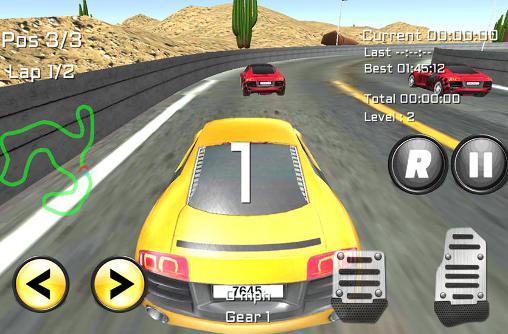

Guide on how to install games on your Android phone/tablet using your PC (with USB cable)
1. Preparing your Android phone/tablet for installing the game
1. Install ES File Explorer a file manager app to your device. Tap Install and after you finish downloading the files it’ll automatically be installed to your device. Do open the app tap Open.

2. Enable Trust unknown sources option
Menu > Setting > Security > mark on Trust unknown sources if there is no mark




1. Install ES File Explorer a file manager app to your device. Tap Install and after you finish downloading the files it’ll automatically be installed to your device. Do open the app tap Open.

Menu > Setting > Security > mark on Trust unknown sources if there is no mark

Note: Different devices may have different paths to Trust unknown sources and USB debugging options and it may differ from the path we show here.
3. Enable USB debugging option
Menu > Settings > Applications > Development > mark on USB debugging if there is no mark
3. Enable USB debugging option
Menu > Settings > Applications > Development > mark on USB debugging if there is no mark

2. Guide on how to install games using your PC (with USB cable)
Important! If you’re planning on downloading games to your phone or tablet using Wi-Fi you’ll need this guide
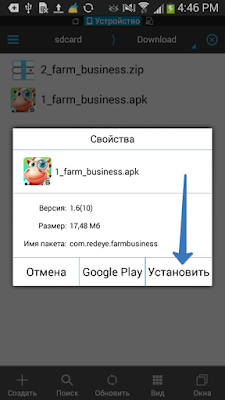
1. Let’s look at how you install a game with cache using Farm business as an example. Download 2 files (*.apk installation file and *.zip cache file), that are under the game description to your PC to any folder you created or to your Desktop.


2. Plug your phone/tablet via USB cable using Mass Storage Mode or Media Transfer Protocol (MTP) and copy two files you downloaded to Download folder, the root folder of your memory.

To see the files you downloaded using your phone/tablet you need to have ES File Explorer (for more details see step 1 of Preparing your device)
The game files will look like this through ES File Explorer on your device
The game files will look like this through ES File Explorer on your device

3. Select the *.zip file and tap Extract. In the pop up window you’ll need to enter the correct cache path (usually the cache path is indicated on mob.org under the game description, if it’s not there you can find out where to place the cache here and tap OK.

4. After you extract files go back to Download folder (previous step), tap the *.apk file and then Install.

5. After the installation is complete run the game and enjoy it.

6. We recommend deleting installation files from your Download folder after that, so your device remains clutter-free.
Holding your finger on the file will select it and then you can delete it by selecting Delete in the menu at the bottom of the screen.
Holding your finger on the file will select it and then you can delete it by selecting Delete in the menu at the bottom of the screen.


Monday, April 13, 2015


The World II Hunting BOSS android game WITH APK AND DATA 100% WORK

.png)
.png)
.png)
Games from Gameloft - sdcard / gameloft / games / (* name of the game). If the game with the Market, then the path will be different - / sdcard / Android / data / (name of the game *)
Games from Electronic Arts (EA) - sdcard / Android / Data / (game name)
Games from Glu - sdcard / glu / (name of the game *)
Games from other developers - sdcard / data / data / (name of the game *) or sdcard / (name of the game *)


WWE Presents: Rockpocalypse android game with data 100% work


Games from Gameloft - sdcard / gameloft / games / (* name of the game). If the game with the Market, then the path will be different - / sdcard / Android / data / (name of the game *)
Games from Electronic Arts (EA) - sdcard / Android / Data / (game name)
Games from Glu - sdcard / glu / (name of the game *)
Games from other developers - sdcard / data / data / (name of the game *) or sdcard / (name of the game *)
Zombie Fortress : Dino Pro ANDROID GAME WITH APK AND DATA 100% WORK


.jpg)
.jpg)
.jpg)
.jpg)
.jpg)
Games from Gameloft - sdcard / gameloft / games / (* name of the game). If the game with the Market, then the path will be different - / sdcard / Android / data / (name of the game *)
Games from Electronic Arts (EA) - sdcard / Android / Data / (game name)
Games from Glu - sdcard / glu / (name of the game *)
Games from other developers - sdcard / data / data / (name of the game *) or sdcard / (name of the game *)

Need for Speed Hot Pursuit ANDROID GAME WITH APK AND DATA 100% WORK


Games from Gameloft - sdcard / gameloft / games / (* name of the game). If the game with the Market, then the path will be different - / sdcard / Android / data / (name of the game *)
Games from Electronic Arts (EA) - sdcard / Android / Data / (game name)
Games from Glu - sdcard / glu / (name of the game *)
Games from other developers - sdcard / data / data / (name of the game *) or sdcard / (name of the game *)
Street Fighter IV ANDROID GAME WITH APK AND DATA 100% WORK


Games from Gameloft - sdcard / gameloft / games / (* name of the game). If the game with the Market, then the path will be different - / sdcard / Android / data / (name of the game *)
Games from Electronic Arts (EA) - sdcard / Android / Data / (game name)
Games from Glu - sdcard / glu / (name of the game *)
Games from other developers - sdcard / data / data / (name of the game *) or sdcard / (name of the game *)
I Gladiator android game WITH APK AND DATA 100% WORK


Games from Gameloft - sdcard / gameloft / games / (* name of the game). If the game with the Market, then the path will be different - / sdcard / Android / data / (name of the game *)
Games from Electronic Arts (EA) - sdcard / Android / Data / (game name)
Games from Glu - sdcard / glu / (name of the game *)
Games from other developers - sdcard / data / data / (name of the game *) or sdcard / (name of the game *)
Subscribe to:
Posts
(
Atom
)